
Excel Modeller
Build financial models people can actually trust.
Learn the scoping, design, build and testing technique used by top consultancies, applied through a real, end-to-end model build. For confident Excel users who want a consistent, established methodology.
- Build a real 13-stage model during the course, not just watch one
- Applies to any model: long-range forecasts, business cases, pricing analysis, cost allocation models
- Covers P&L modelling in depth, not a generic tour of everything
- Taught by a CIMA-qualified, ex-PwC financial modeller
12-month access · CPD certificate included · Monthly plan available
Enrol Now: £325 + VAT


















The PROBLEM
Every model looks different, and nobody's checked any of them.
Most people learn modelling by copying whatever they inherited. There's no established approach or structure, and no formal check for errors before a model reaches management.
✗ Inconsistency
Every finance professional builds differently. No easy way to hand a model to someone else, or pick one back up yourself.
✗ Risk
Formulas built without checks. Errors are rarely caught until the model is already in front of management.
✗ No formal training
Most modelling skill is self-taught by copying old files, not learned from any structured, best-practice approach.
The solution
What if every model build followed the same professional approach?
The Excel Modeller course teaches a repeatable framework: scope, design, build, check and test, the same way, whatever you're modelling.
✓ A repeatable framework
The Model Development Framework gives you a structured approach to developing any model
✓ Built-in checks
A Check Sheet and formula discipline that catch errors before management sees them.
✓ A model anyone can pick up
Clear structure and documentation mean a colleague, or you in six months, can actually follow it.
What makes this different
Why not just take a standard financial modelling course?
Most Excel financial modelling courses are built by ex-investment bankers and, rather than focus on technique, focus on teaching, at a high-level, one specific model: the integrated three-statement model, linking the P&L, Balance Sheet and Cash Flow, a niche model rarely produced by accounting & finance teams.
Excel Modeller teaches something broader: the best-practice techniques top consultancies use to scope, design, build and test any model.
- The same techniques can be applied to a robust P&L forecast, business case, cost allocation model or pricing analysis, rather than just one use case
- Taught through a real, end-to-end 13-stage model build, not just theory
- Covers P&L modelling in depth. No Balance Sheet/Cash Flow integration, VBA or Pivot Tables, so focus stays on technique
- Consultancy-grade rigour: checks, version control, and a framework you reuse on any future model
Used for: Forecasts · Budgets · Business cases · Pricing models · Cost allocation models · Long-range plans
Who this is for
Is Excel Modeller right for you?
Designed for accounting and finance professionals with a regular need to build models.

Finance professional
You work in FP&A, financial control, finance director, a similar finance function, or as a consultant

Confident Excel user
Comfortable building your own formulas and calculations, and use Excel frequently

No formal training
Never had a structured, best-practice approach to the scope, design, build or checking of models

Want to build hard skills
Looking for a consistent, structured approach to apply to any model, not just tips for one
Check your fit: you're ready for Excel Modeller if you're comfortable with INDEX/MATCH, SUMIFS, IF/AND/OR, and building your own formulas. Knowing tools like Data Tables and Trace Precedents/Dependents is a bonus. If that's not quite you yet, our Excel Analyst course will get you there first, or the Excel Pro Bundle below includes both. You don't need to be an accountant; a basic grasp of P&L structure is enough.
What this course doesn't cover: integrated Balance Sheet or Cash Flow modelling, VBA/macros, or Pivot Tables and charting. Excel Modeller covers P&L modelling only. (See 'What makes this different' above for why).
Course overview
See the course, and the model you'll build, in six minutes
A short walkthrough of the Model Development Framework, the model you'll build during the course, and why the technique applies to any model.
▶ 6 minutes
What you will be able to do
By the end of this course, you will be able to:
The aim isn't that you leave an expert modeller; that only comes with experience. Instead, you'll leave with a strong knowledge of the route to becoming one, and the modelling knowledge to start putting it into practice immediately.
✓ Scope and specify a model properly before opening Excel
✓ Structure any model with a clear separation of inputs, calculations and outputs
✓ Build in checks, version control and documentation so your model can be trusted and handed over
✓ Use flags, counters and a Timeline to simplify and control your calculations
✓ Apply corkscrew calculations, helper cells and other consultancy-grade techniques
✓ Spot and prevent the errors that creep into spreadsheets using structured techniques and industry-leading tools
✓ Calculate DCF and investment appraisal metrics: NPV, IRR, payback
✓ Apply the same technique to forecasts, budgets, business cases or pricing models
Course outcomes & theory
See what you'll build
Snapshots of the model you build during the course and the theory that supports the learning.
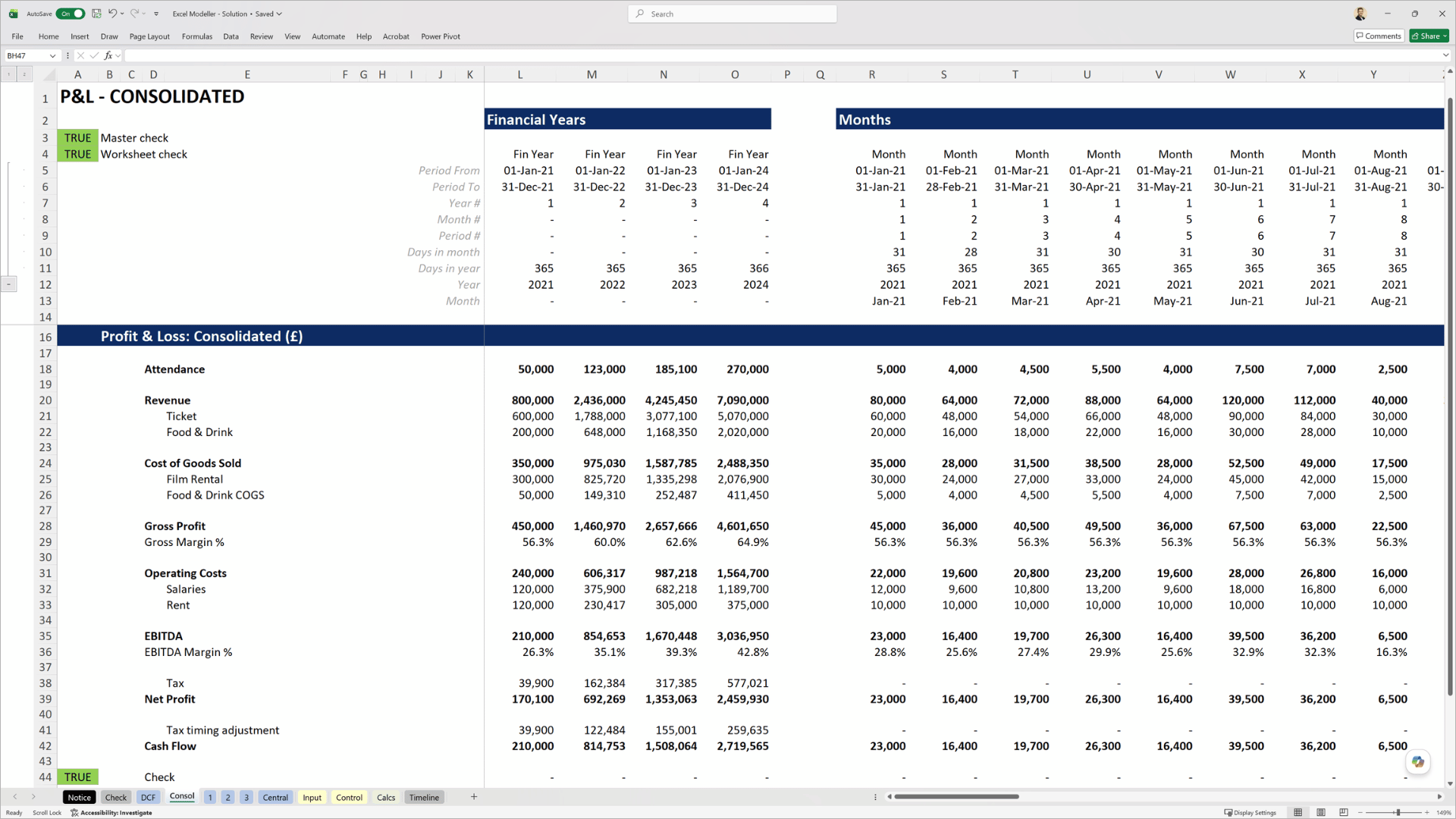
Model outputs: simple consolidated P&L at monthly level of granularity. Produce clear, professional outputs that present information to stakeholders in a trusted format.
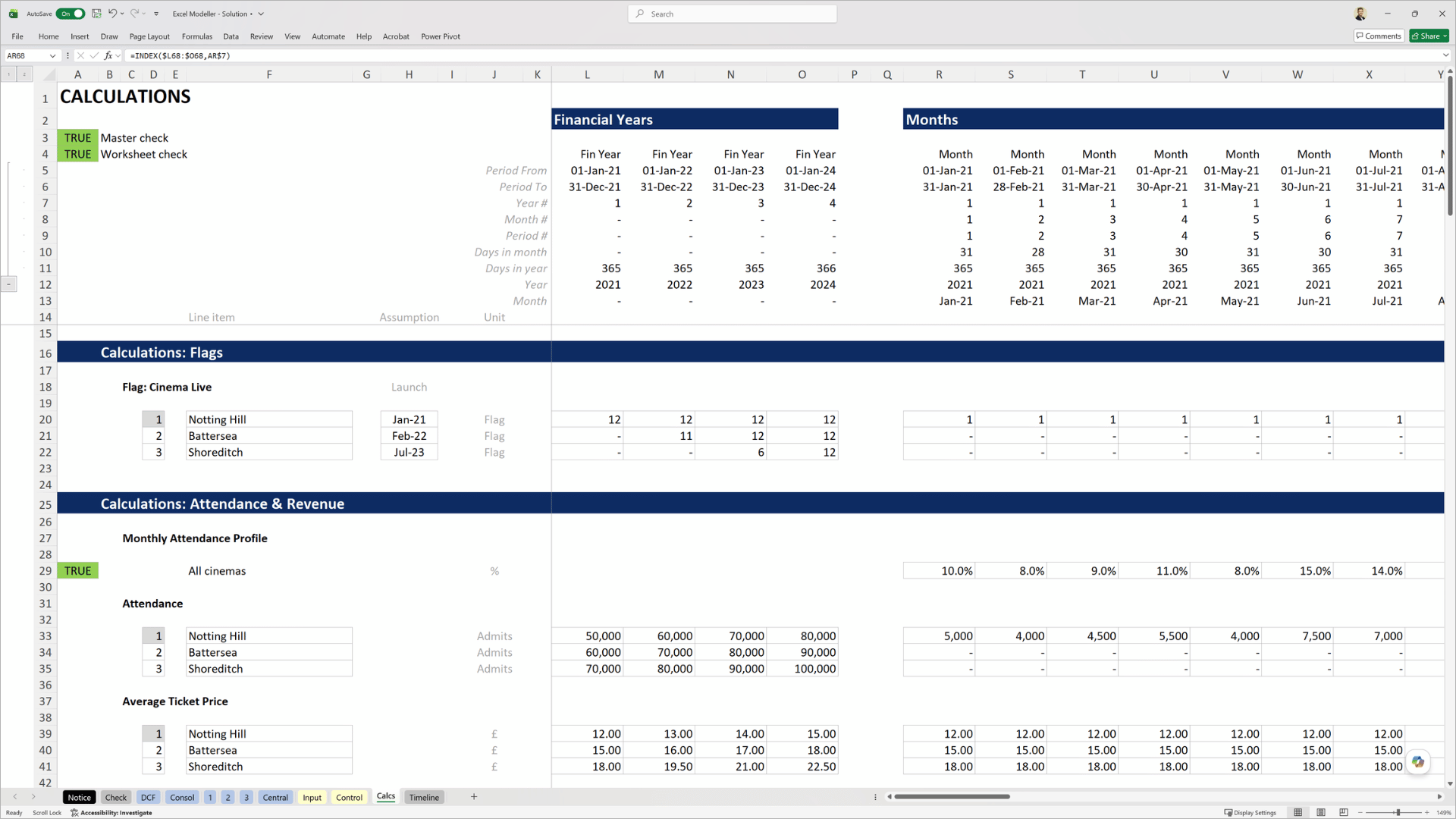
Model calculations: calculation page featuring timeline, flags, and linked assumptions. Adopt a structured approach to creating model calculations in a 13-stage model build practical task.
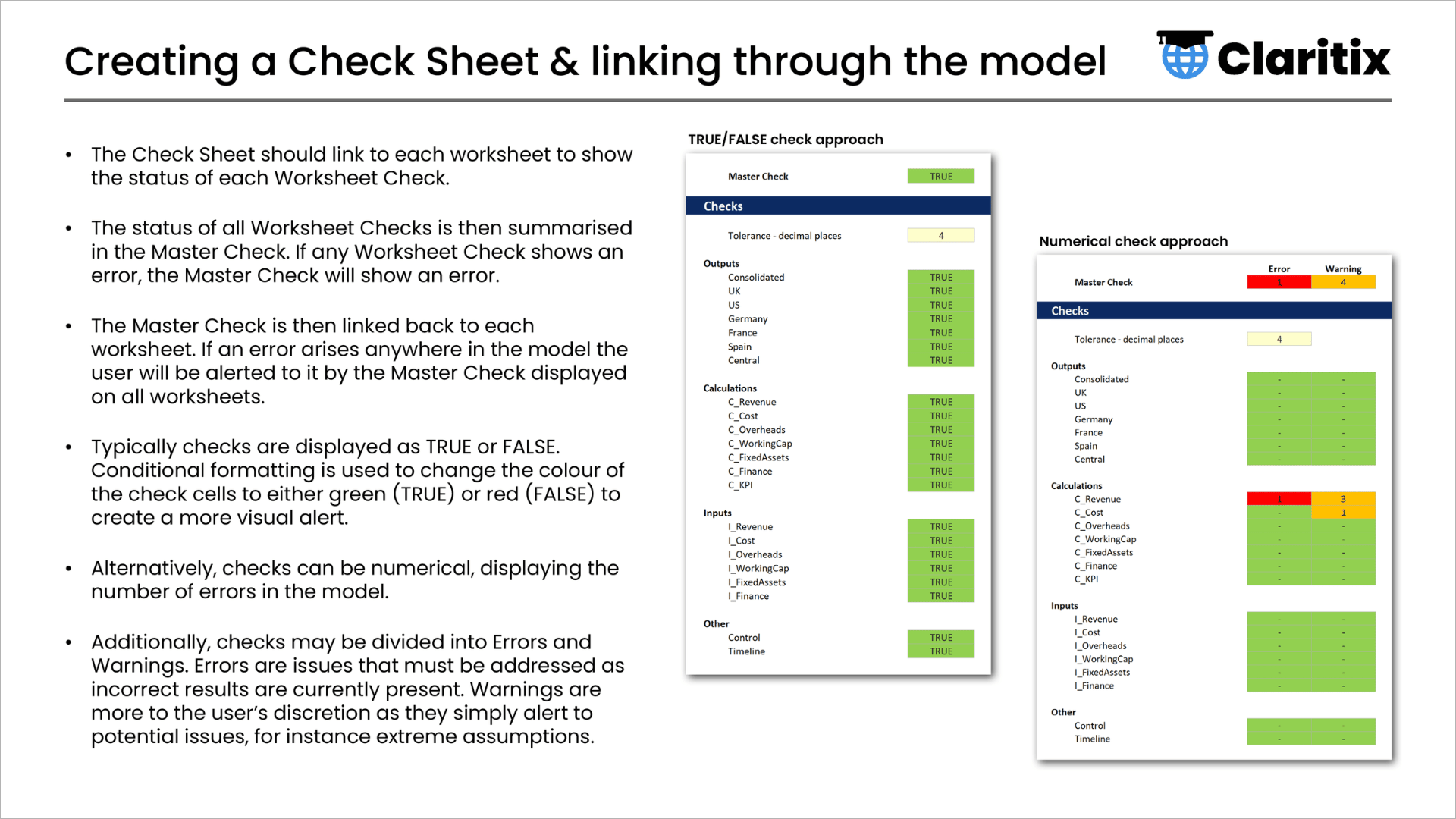
Theory slides: practical demonstrations and exercises are supported throughout by video theory lectures and a downloadable slide deck.
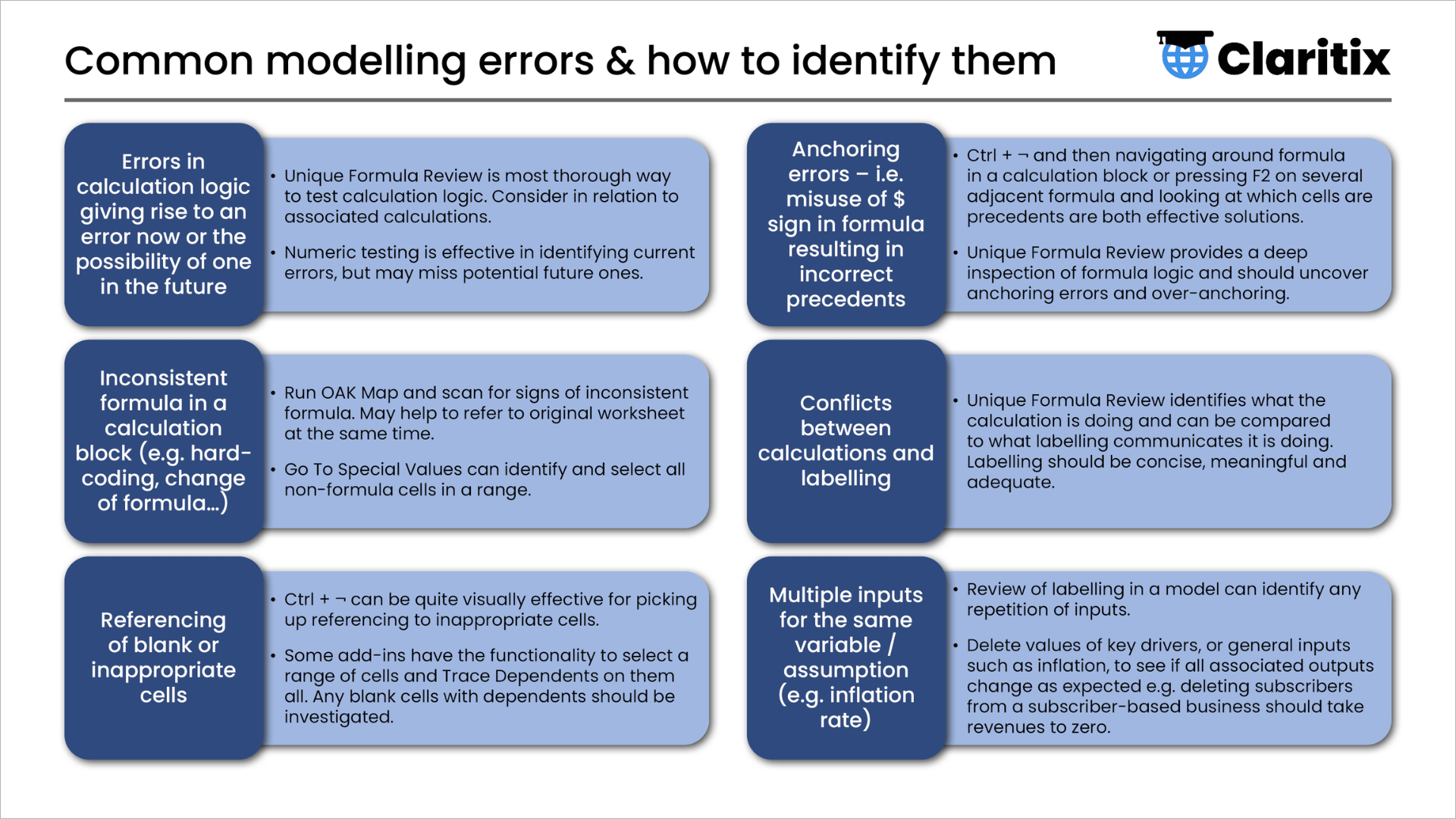
Theory slides: Course content goes beyond just creating the model to include how to test for and locate errors, use the model, document your work, and more.
Course content
What the course covers
8 sections · 7.5 hours of video · 13-stage model build · 11 quizzes
Each section begins with the theory, then shows exactly how it applies as you build the model.
Modelling Basics
Model Design
Timeline, Flags & Timing Components
Outputs, Calculations & Inputs
Checks
Review & Testing
Using the Model
Must Knows
Tasks and Exercises
What is included
Everything you need to learn, practice, and apply
The course is not just video. You get a complete package of materials to support your learning and apply it to your own modelling immediately.

79-page slide deck
The full course theory in one downloadable reference document

13-stage model build
Apply the learnings to an end-to-end model build as you progress through the course

Solution & support files
Check your work at every stage and support your real modelling projects with scope and specification eBooks

11 quizzes
Test your understanding at each stage of the course

Completion certificate
Personalised PDF certificate for CPD records on completion

12-month access
Learn at your own pace – no pressure, no subscription
About the course creator
Built by a financial modeller, for finance professionals

Dan Stockdale
CIMA-qualified · 15 years in FP&A and financial modelling · Former PwC modelling consultant
Dan built Excel Modeller from 15+ years' experience as a financial modeller and commercial analyst, including time as a financial modelling consultant at PwC's strategy practice, Strategy&, where he co-trained their internal best-practice modelling course.
He’s built and reviewed models as a consultant, contractor and permanent employee, across education, media, engineering, retail and leisure, in London and Sydney.
"Over my career I've worked across many finance functions and seen the types of models finance builds; their quality, the approach taken to creating them, and the problems they encounter. I've also seen how the top consultancies do things.
There is a big gap between the two – it comes down to an established methodology and techniques being applied throughout the design, build and testing of the model. This isn't complex but does need to be formally learned. A self-taught, ad hoc approach very rarely produces a good model.
This course teaches that gap: the difference between a model that's unclear, risky, but just about works, and one you can actually trust, hand over, and build on. It's the standard I try to bring to every model I build."
Dan Stockdale
Founder, Claritix
Testimonials
What learners say

"I've always wanted to advance my Excel skills, and this course was excellent. It's clearly structured, with a strong balance between theory and practical workshops that were easy to understand and apply. I was able to implement changes from day one, and my models quickly became more refined and easier to navigate.
I'd recommend this course to finance professionals with a solid level of Excel knowledge who want to take their financial modelling to the next level."
Claire Hankey
Head of Finance, Zigzag
"Very informative and easy-to-follow Excel financial modelling training. Highly recommend for all levels of ability."
Khilan Haria
Head of Strategic Planning, David Lloyd Leisure
Certificate & CPD
Earn a certificate. Support your CPD.
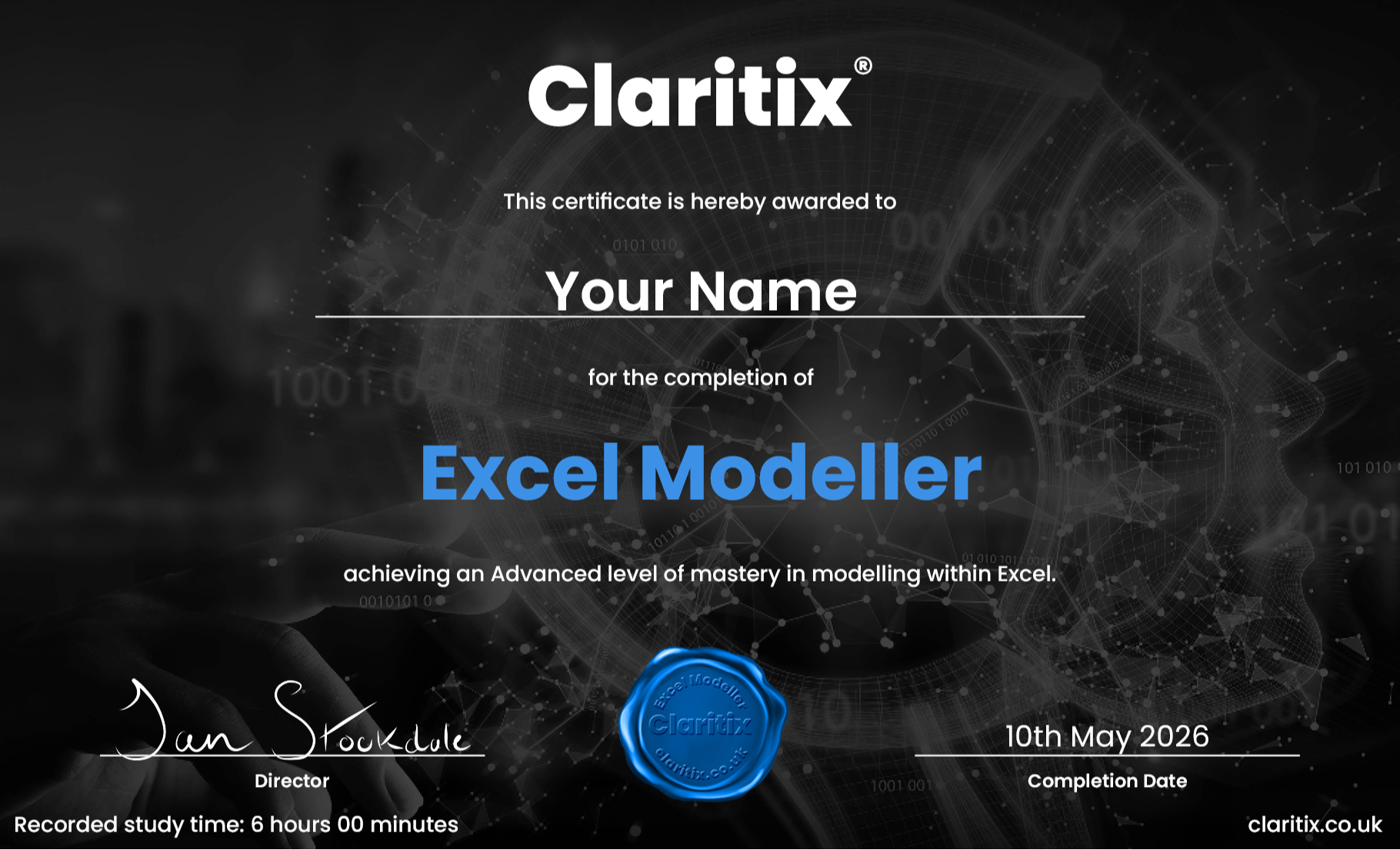
On completion you’ll receive a personalised PDF certificate showing your name, the course title, completion date and your recorded study time, designed to support CPD record-keeping.
Whether you are working towards a CIMA, ACCA, ICAEW, or CIPFA CPD commitment, this course provides verifiable evidence of structured learning. A VAT receipt is available following purchase, making it straightforward to expense through your employer’s training budget.
If you're outside the UK, particularly in the US, please check your professional body's specific requirements before relying on this certificate for CPD/CPE purposes. Claritix courses are not currently certified by NASBA.
Free resource
Not ready to enrol yet? Start here for free.
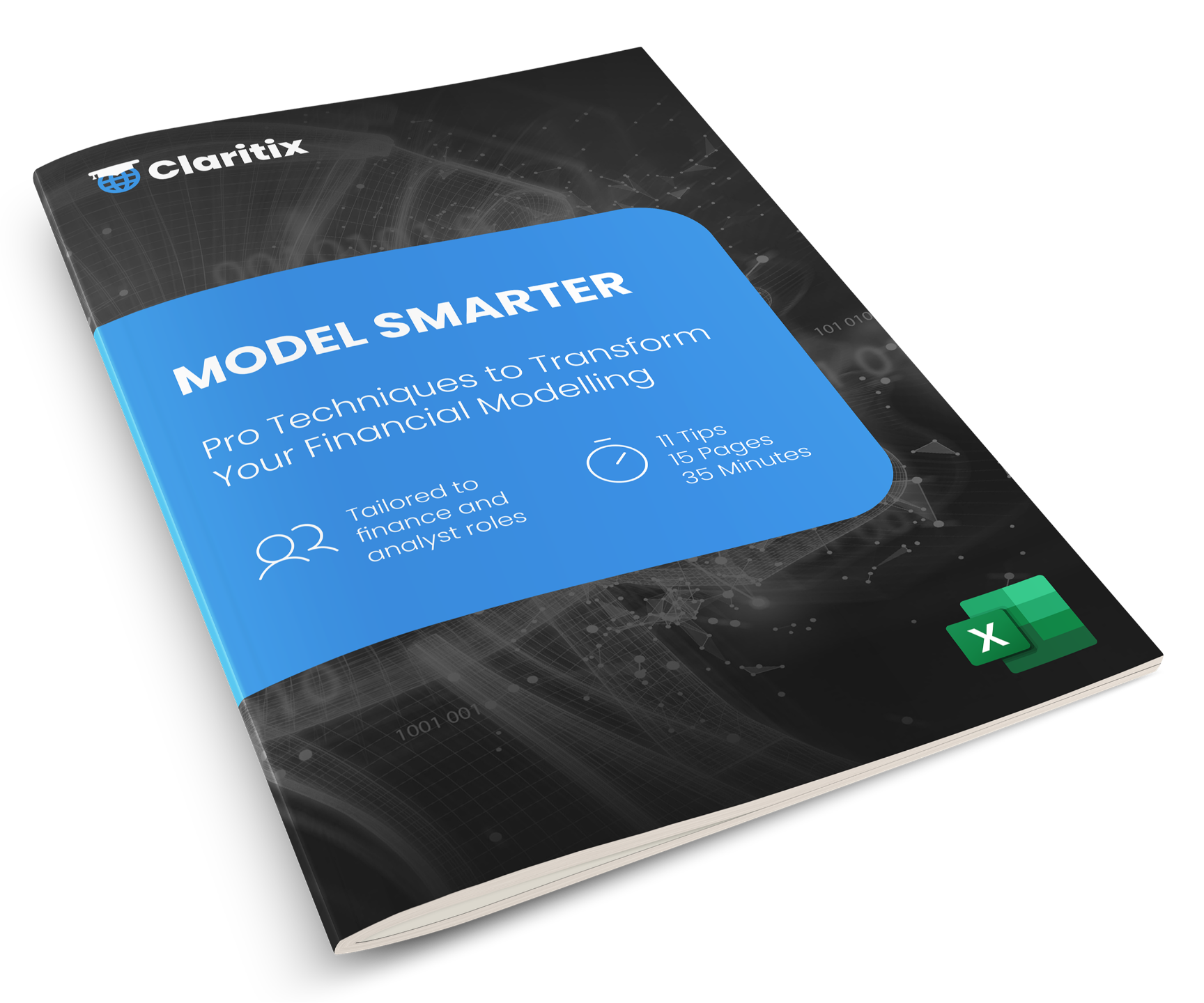
Get 11 practical tips from Excel Modeller straight to your inbox: flags, checks, version control, formula best practice and more. See the standard of the course content before you commit.
Sign up below and we will send it straight to your inbox. No spam. Unsubscribe at any time.
By subscribing you agree to your data being stored and receiving occasional marketing emails.
Pricing
Invest in yourself
Both options include immediate access to all course materials. Single payment, no subscription, no auto-renewal.
FAQ
Frequently asked questions
Is my Excel good enough for this, or should I do Excel Analyst first?
Is this a three-statement / investment-banking-style modelling course?
Does this cover Balance Sheet and Cash Flow modelling?
Do I need to be an accountant, or have modelling experience already?
Will I get files and exercises, not just video?
Can I expense this, and does the certificate count towards CPD?
How long will it take?
Should I buy this course or the Excel Pro Bundle?
What happens after I buy?
Ready to start?
Ready to model to a better standard?
Join Excel Modeller and start building models that are structured, checked and built to last, whatever you're modelling.
12-month access · No subscription · CPD certificate included · Immediate access on purchase